
Solution for Complex HTML Table Layout
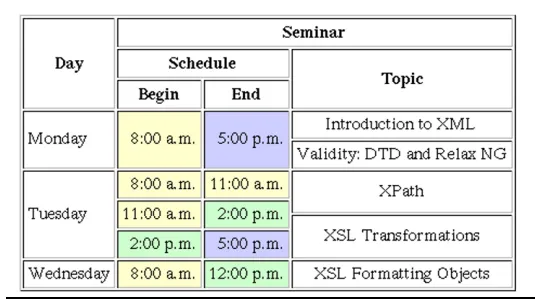
There is not a complex HTML layout.Let's discuss What are the basic of HTML table step by step
Mainly HTML table include row and column.
First HTML table wrap with opening and closing table tag as below.all the table content include over it.
<table>
/*content show in this*/
</table>
Second should make table row.
<tr>
</tr>
Then make table headings with td tags.It should inside the tr tag.
<tr>
<td>name<td>
<td>age<td>
</tr>
After should make table details inside table tr tags.
<tr>
<td>name<td>
<td>age<td>
</tr>
<tr>
<td>Sajith<td>
<td>22<td>
</tr>
<tr>
<td>Kamal<td>
<td>20<td>
</tr>
Now we can see our output above basics.
We should have an idea of rowspan and colspan to solve the above complex HTML table
The colspan attribute can be used to make a cell span over many columns
The rowspan attribute can be used to make a cell span across multiple rows
Below codepen shows the example for using of colspan and rowspan
Now we see What is the output of Complex HTML layout.
chrome web bowser not showing output correctly please use firefox.
Solution for Complex HTML Table Layout